
Free Photo To URL
Upload your photo → get a link → use it anywhere
Drag a photo here
We'll enhance and host it, then return a clean link.
Drag or click (JPG/PNG, up to 2MB)or drop a file
JPG, PNG, WEBP, GIF up to 2MB (10 uploads/day free). Drag & drop, click, or paste screenshots.
No image? Try one of these:


By uploading, you confirm you have the right to share this content and agree not to upload illegal or prohibited material (including infringement, child sexual exploitation, pornography, terrorism/violence, hate or harassment, scams, malware, or privacy violations). Public links are accessible to anyone with the URL; violations may be removed or banned, and the upload source traced.
How it works
- 1
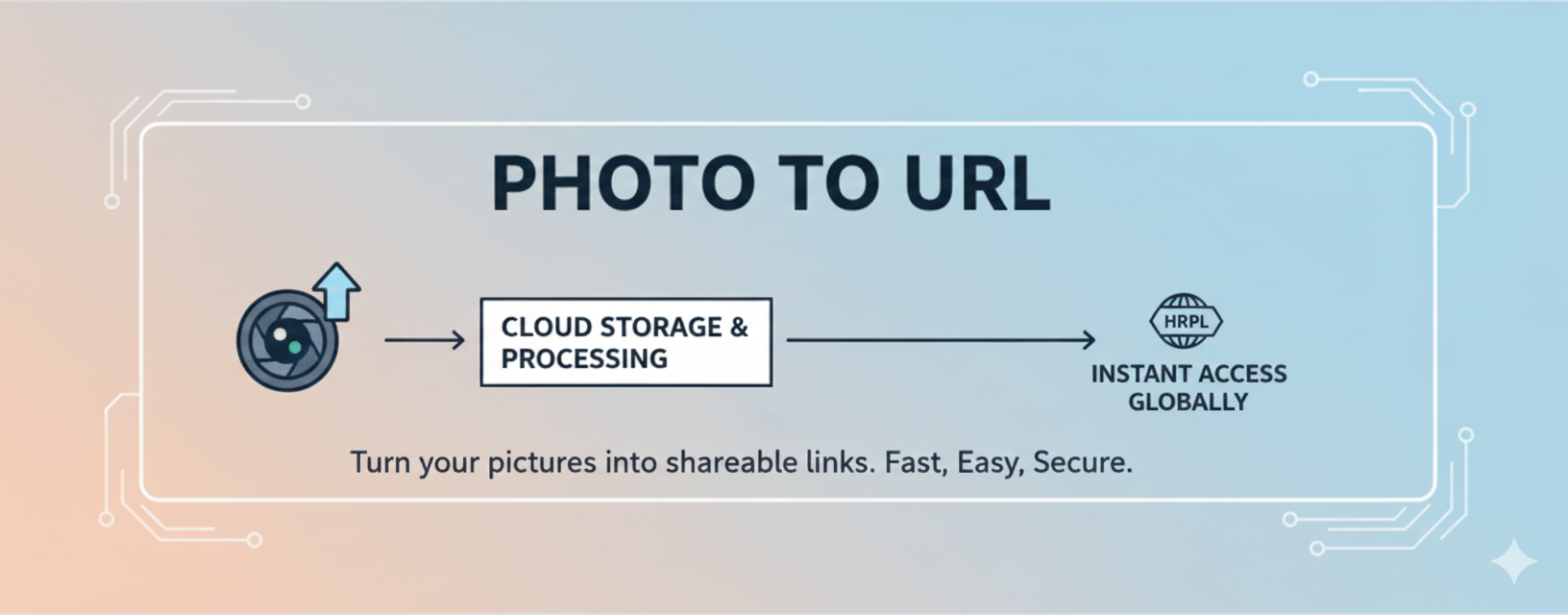
Add your photo (drag, paste, or click to pick a file).
- 2
We host it and return a shareable link.
- 3
Copy and share the link in docs, chats, prototypes, and more.
Your link opens fast in docs, chats, and prototypes — and you can save it in the format you want.
Why people choose Photo To URL
Speed — Try free: 10 uploads/day, 2MB per file
Fast sharing
Upload and get a link in seconds with no extra steps.
Direct image URLs
Clean links that work in HTML, Markdown, and chat apps.
Free trial
10 uploads/day, 2MB per file.
Teams saving time with Photo To URL
Social proof to reduce risk and speed up adoption.
We paste screenshots into tickets without clogging attachments. Links stay clean.
Markdown-ready links keep our docs tidy and publishable in minutes.
Clear errors and instant URLs make it easy to guide customers in chat.
Feature highlights
Clarity first: less friction, more sharing.
Direct CDN links
Clean, predictable URLs ready for Markdown and HTML embeds.
Copy & Save
Copy, open, or save the link in the format you want.
Clipboard friendly
Paste screenshots without hunting for files or re-uploads.
Secure & Private
Images are securely hosted with encryption in transit and at rest.
Free trial
10 uploads/day, 2MB per file.
Fast hosting
Links are served via fast CDN for quick loading and reliable access.
Why Photo To URL helps your workflow
Photo To URL is built for creators, marketers, support teams, founders, and anyone who needs a quick, reliable way to turn photos into clean links. With a direct upload-to-link flow, you avoid heavy media managers and skip logins. Links are tidy, easy to use in chat apps, docs, wikis, bug reports, and tickets. Teams move faster when screenshots and product photos are instantly shareable without attachment limits or messy previews. Because the links are predictable and consistent, they also work well in automation, QA steps, and lightweight prototypes.
The experience stays simple: drop, paste, or browse; get a link; share. No extra chrome, no distracting ads, no gating. You keep focus on your content while we handle the boring parts of hosting. Whether you are documenting a feature, preparing a blog post, building a pitch deck, or sending a quick support response, a short link beats bulky attachments. For global teams, the interface is available in multiple languages while keeping copy concise and universal.
Use cases that stay practical
- Product & design: share UI captures and visual notes without bloated files.
- Support & QA: paste reproducible screenshots into tickets and runbooks quickly.
- Docs & content: embed direct image URLs in Markdown, HTML, and CMS editors.
- Sales & success: send walkthrough visuals in email and messaging with clean links.
- Engineering handoff: keep review artifacts lightweight and easy to reference.
- Community channels: share links in Slack, Discord, Teams, and forums cleanly.
How the flow works end-to-end
1) Choose an image: drag-and-drop, paste from clipboard, or click to browse. PNG, JPG, WEBP, GIF up to 2MB on the free tier (10 uploads/day). 2) We upload and return a direct link. The UI shows your URL immediately with copy, open, and save-in-your-format actions. 3) Use the link anywhere: blogs, docs, tickets, chat, prototypes, and more. The goal is a frictionless bridge between your photo and the places you work.
Each step is tuned for clarity: visible status, friendly errors, and buttons that confirm actions. The copy button sits next to the link, and the save buttons let you keep the URL in your preferred format for bookmarking or automation. When CDN is enabled, links serve from the CDN domain; your images are stored securely with secure encryption.
Best practices for cleaner links
- Use descriptive filenames before upload for easier search and management.
- Prefer optimized WEBP/JPG/PNG to keep payloads small.
- Copy immediately after generation to avoid stale clipboard content.
- Save the link in the format you want when you need to take it with you.
Roadmap highlights
Next steps include clearer quota management, clearer quota management, team collaboration, access control, and link analytics. We are also improving image tools such as circle crop, rounded corners, and background removal.
FAQs
Is it free?
We offer a free tier: upload-to-link and other core features work within free limits (daily uploads, total storage, per-file size). If you want higher limits, choose a paid plan: links are hosted on our CDN with higher quotas and a larger per-file size cap.
What formats are supported?
PNG, JPG, WEBP, and GIF are supported within the current per-file size limits; more formats may be added if demand grows.
Can I embed in Markdown or HTML?
Yes. Copy the link directly, or save it in the format you want and use it wherever you need — Markdown, HTML, docs, or a CMS.
Do you keep my files public?
Links are shareable. When CDN is enabled, files are served from the CDN domain. If storage is temporarily unavailable, we show clear maintenance notices.
Will there be accounts or teams?
Yes. We are prioritizing a simple, reliable upload-and-share experience first, then adding team workspaces, access control, and analytics step by step.
Can I get a refund after payment?
We generally do not offer refunds where the service remains available for normal use. If you cannot use the service during your paid period due to an issue on our side, we will review your case after verification and, where appropriate, agree next steps with you.
How do I cancel renewal?
Renewal is charged automatically to the card you authorized. To stop future charges, cancel automatic debit or recurring billing with your card issuer via mobile banking, online banking, or customer service.
How long can I keep using the service after I cancel?
You can usually continue using the service for the period you have already paid for. After that period ends, no further charges will be made and your benefits end with that period.
For the above and other questions, please use the Contact us page on this site or email [email protected]. We aim to reply within 1–2 business days.

About Photo To URL
PhotoToURL is a free image to URL converter and image link generator that helps you upload images and instantly generate shareable image links. Easily convert JPG, PNG, WEBP, and other image formats into direct image URLs for fast online sharing.
Whether you need a quick photo to URL or free image hosting with CDN links, PhotoToURL makes it simple, secure, and reliable. Upload your image and get a direct link in seconds. Free tier: 10 uploads/day, 2MB per file — see Pricing for higher limits.